




NG / Payments
Depositing on Stake.com from Nigeria: A Step-by-Step Walkthrough with Real Screenshots
Tested on 23 March 2026 • 10 USDT via BEP-20 • Funded from Bybit
18+ only. Fees, limits and screens may have changed since our test date above. Stake is an offshore crypto casino, not licensed by a Nigerian regulator, so check the rules where you live before you deposit: see Is Crypto Gambling Legal in Nigeria? and state-by-state gambling laws.
If you’re a Nigerian player thinking about depositing on Stake.com for the first time, the one question you actually want answered is simple: will my money go in without a headache? Debit cards get declined. Bank transfers get flagged. Local currency rails are unreliable. So the only deposit method that consistently works — and the one most Nigerian players end up using — is crypto.
We tested it ourselves. Below is every single step of a real deposit made from Nigeria on 23 March 2026, screenshot by screenshot, from an empty wallet to a confirmed balance. We funded it from a Bybit exchange account using USDT on the BNB Smart Chain (BEP-20), the cheapest and fastest route for most Nigerian users. The whole deposit — from clicking Wallet to seeing the balance update on Stake — took under three minutes and cost a flat 0.2 USDT in network fees.
Here’s exactly how it went.
The deposit at a glance
| Casino | Stake.com |
| Deposit method tested | USDT (Tether) via BEP-20 (BSC network) |
| Deposit amount | 10 USDT |
| Network fee | 0.2 USDT (charged by sending exchange, not Stake) |
| Fee charged by Stake | None |
| Funding source | Bybit exchange (Funding wallet) |
| Deposit confirmation time | Under 3 minutes (approx. 90 seconds on-chain) |
| Errors encountered | None |
| KYC required to deposit? | No |
| Tester location | Nigeria |
| Test date | 23 March 2026 |
Step 1 — Log in and open your Stake wallet
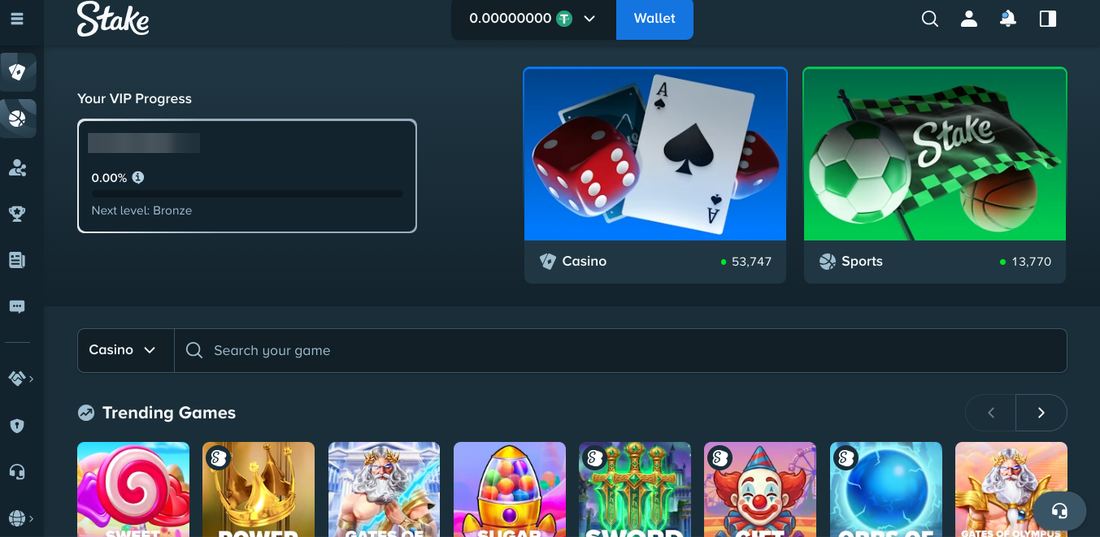
After logging into Stake.com, you land on the main lobby. The balance at the top of the page reads 0.00000000 USDT — empty, as expected for a fresh account. Everything Stake needs you to do next sits behind a single blue Wallet button in the top-right corner.
Step 2 — Click ‘Deposit’ from the wallet overview
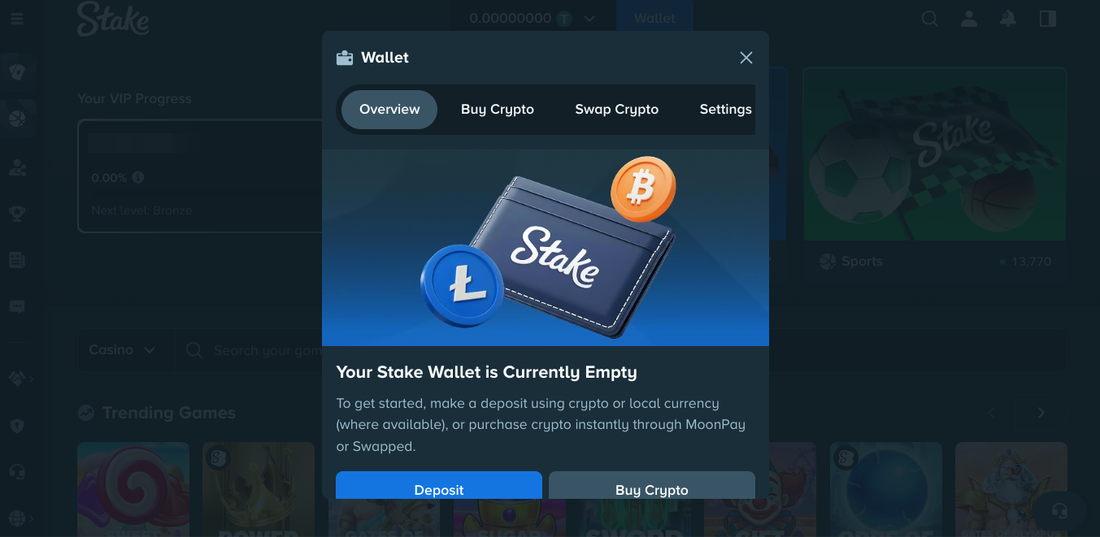
The wallet modal opens with a large illustration and a blunt message: Your Stake Wallet is Currently Empty. Two options sit below it — Deposit (to send your own crypto in) and Buy Crypto (to purchase crypto via MoonPay directly inside Stake). Most Nigerian users already hold USDT on Bybit, Binance, or KuCoin, so Deposit is the right choice.
Step 3 — Pick your coin and network
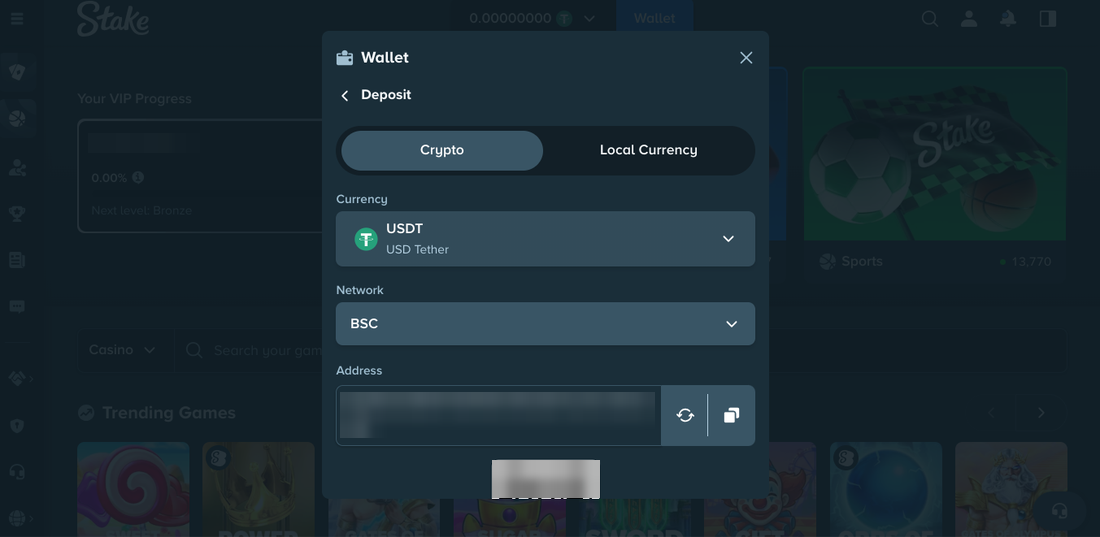
This is the most important screen in the entire flow. Stake supports a long list of cryptocurrencies — Bitcoin, Ethereum, Litecoin, Dogecoin, USDT, USDC, XRP, Solana and more. For a Nigerian player, USDT on BEP-20 is almost always the right pick: it’s a dollar-pegged stablecoin (no volatility risk while your transaction is in-flight), and the BSC network has network fees of a fraction of a cent compared to ERC-20 or Bitcoin.
Under Currency we selected USDT. Under Network we selected BSC (BNB Smart Chain, also called BEP-20). Stake immediately generated a unique deposit address and a QR code:
Important: always match the network on both sides
The single most common reason people lose crypto deposits is sending on the wrong network. If you select BEP-20 on Stake, you must also select BEP-20 on the exchange you’re sending from. Sending USDT over ERC-20 to a BEP-20 address — or vice versa — can result in funds being lost permanently. Double-check both screens before you click send.
Step 4 — Copy the address, switch to your exchange
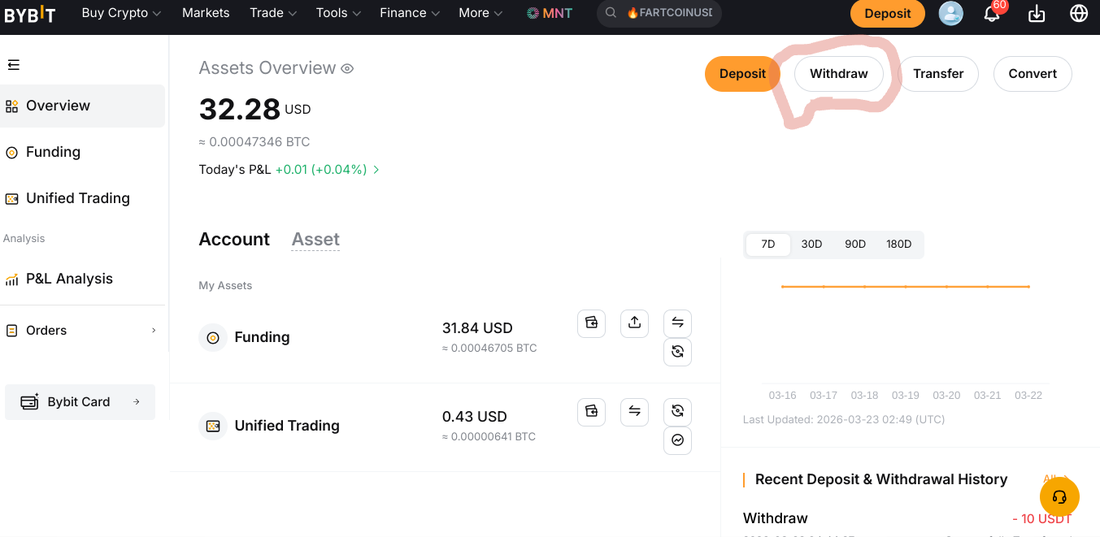
With the Stake deposit address copied, we switched over to our Bybit account to initiate the actual transfer. Any exchange works — Binance, KuCoin, OKX, or a self-custody wallet like Trust Wallet or MetaMask — the process is the same. For this test, the Funding wallet on Bybit held 31.84 USDT, more than enough for a 10 USDT deposit.
Step 5 — Paste the address and set the amount
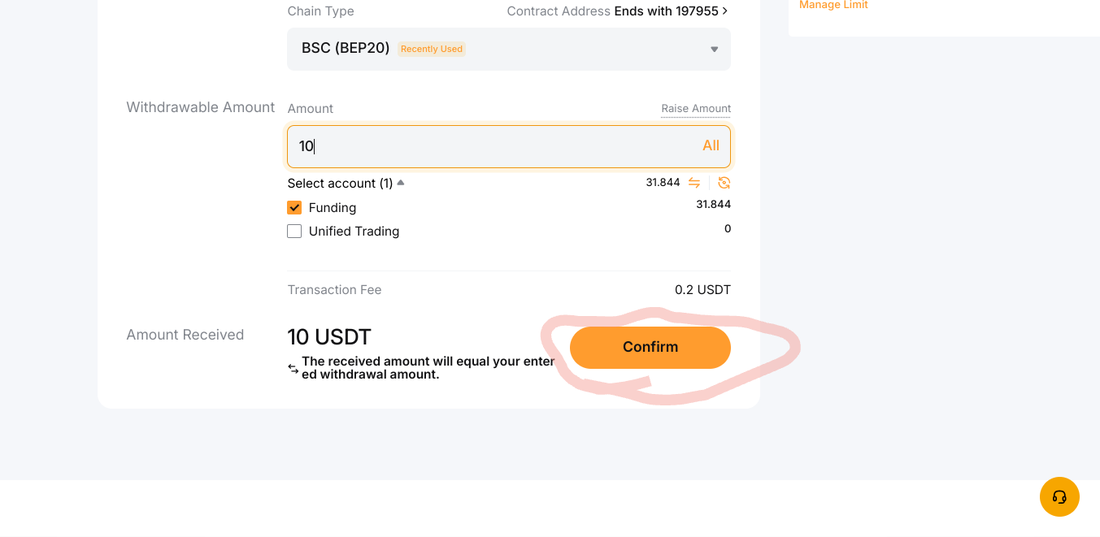
On Bybit’s withdrawal screen, we pasted the Stake deposit address into the Wallet Address field. Bybit recognised the BEP-20 chain type automatically (it was marked Recently Used since it had been used earlier in the test series). Amount: 10 USDT.
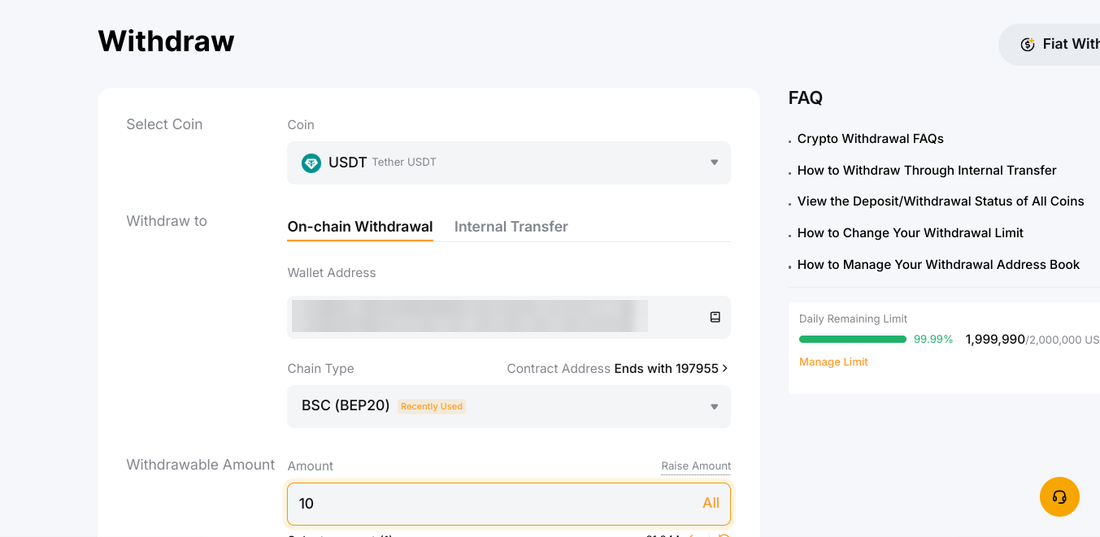
Scrolling down confirmed the network fee Bybit charges for BEP-20 withdrawals: a flat 0.2 USDT. Note this fee is charged by Bybit, not by Stake — Stake doesn’t charge anything to receive. The Amount Received field confirmed we’d receive the full 10 USDT on the Stake side, with the 0.2 USDT fee added on top.
Step 6 — Confirm the withdrawal on Bybit
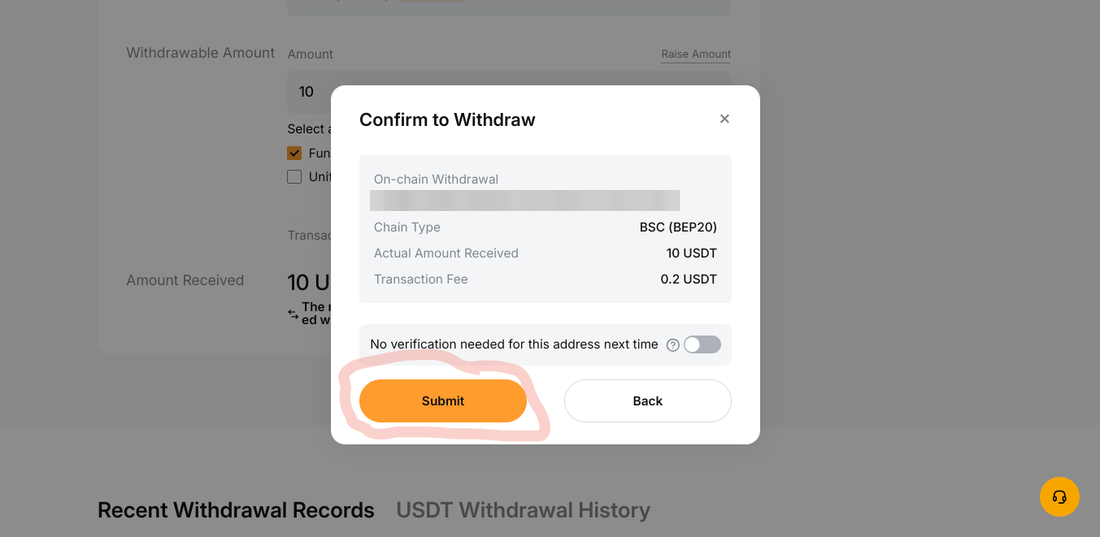
Bybit shows a final confirmation modal with the full transaction summary — the destination address, chain type, actual amount to be received, and fee. A quick sanity check on the address (the first and last characters match what Stake generated in Step 3), then click Submit.
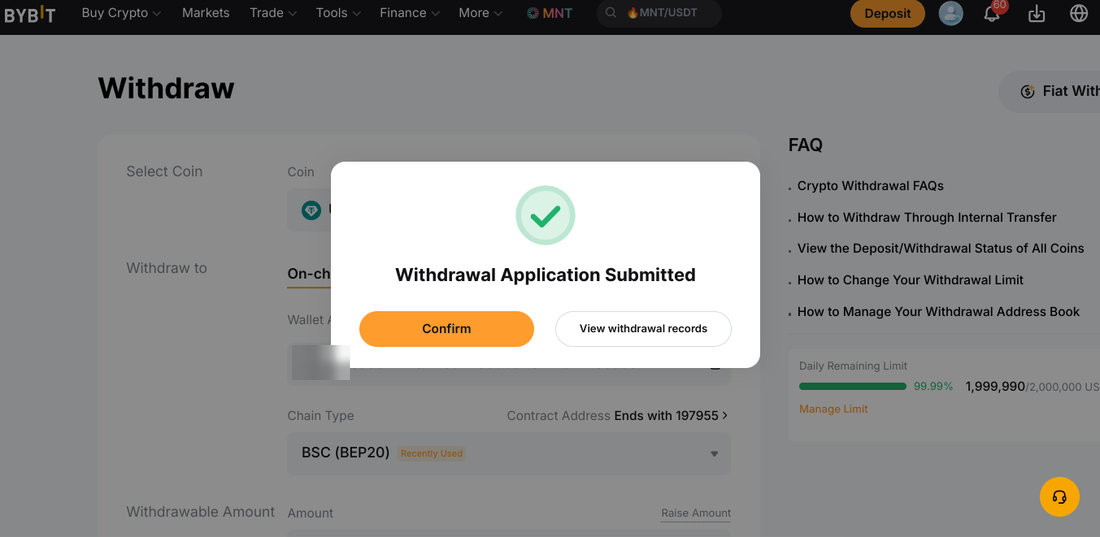
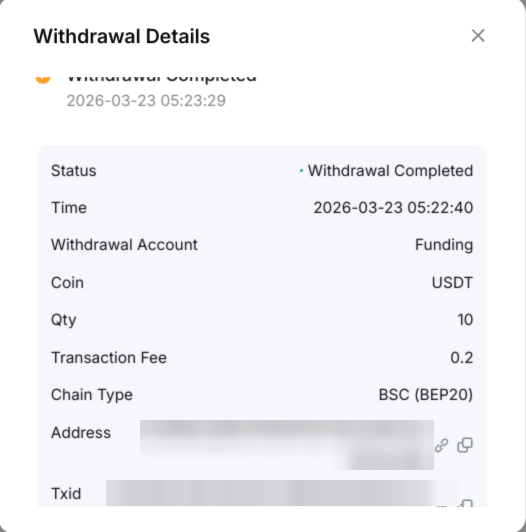
Bybit confirms the request has been submitted. On their side, the withdrawal was submitted at 05:22:40 and fully completed (broadcast on-chain) by 05:23:29 — a total of 49 seconds.
Step 7 — Watch the on-chain confirmation
Bybit’s withdrawal detail panel shows every stage of the transaction with exact timestamps. This is the clearest view of what’s actually happening between the two platforms:
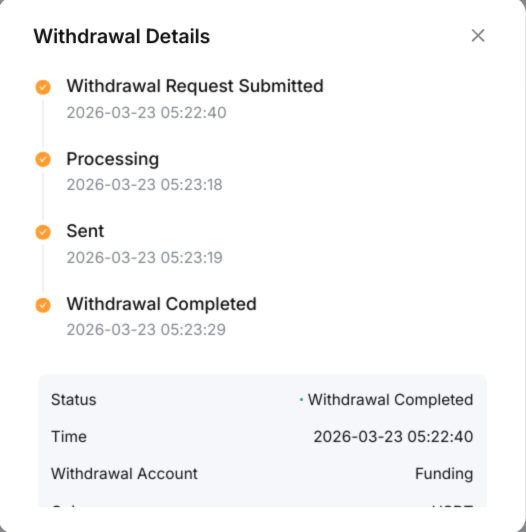
- Withdrawal Request Submitted: 2026-03-23 05:22:40
- Processing: 05:23:18 (38 seconds later)
- Sent (broadcast on BSC): 05:23:19
- Withdrawal Completed: 05:23:29 (49 seconds total)
The transaction details pane on Bybit also captures the full on-chain transaction hash (Txid), which makes the transfer verifiable on any BSC block explorer. We have blurred it, and the wallet address, in our screenshots.
Step 8 — Balance appears on Stake
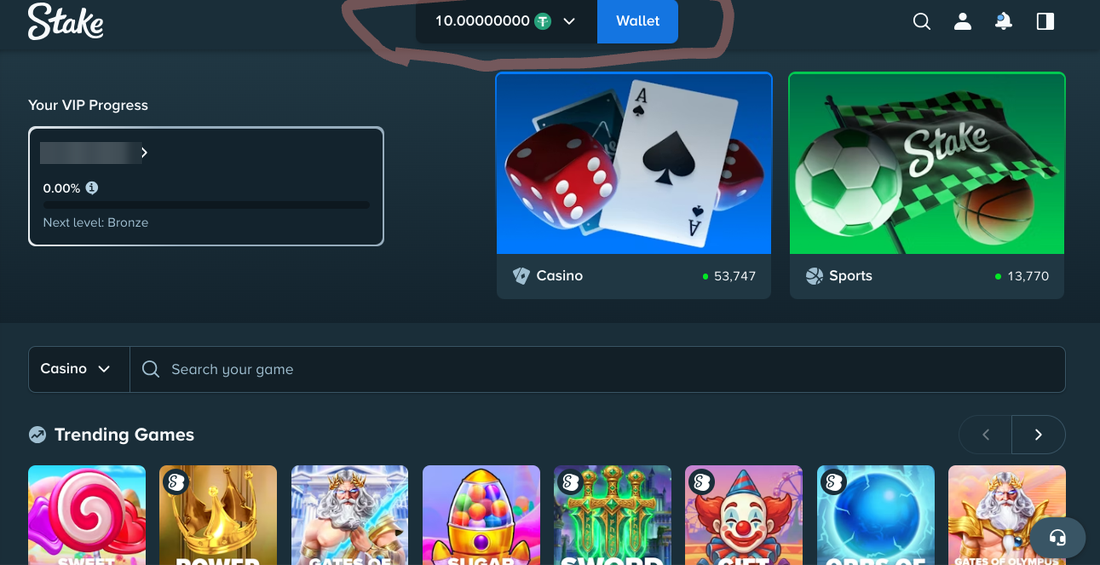
Switching back to Stake.com, the balance at the top now reads 10.00000000 USDT. The full 10 USDT arrived, exactly as quoted — no hidden receiving fee, no conversion spread, no “processing” delay beyond the on-chain confirmation time.
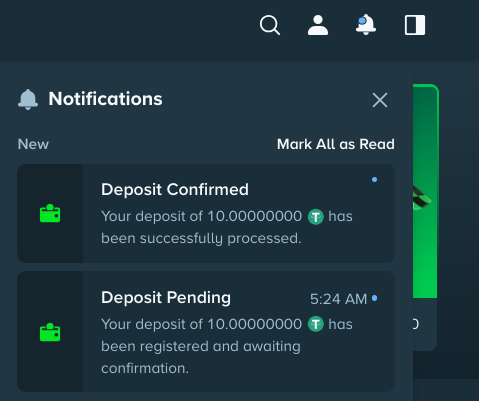
The notification bell in the top-right shows Stake’s own audit trail of the deposit — first as Deposit Pending the moment the transaction hit the mempool, then Deposit Confirmed once BSC had enough confirmations for Stake to credit the funds.
Verdict: was it convenient?
Yes — comfortably so. From a Nigerian user’s perspective, this deposit experience is about as smooth as crypto deposits get.
What worked well
- Speed. Under three minutes from the moment we clicked ‘Wallet’ on Stake to seeing the balance update. The on-chain portion alone was 49 seconds.
- Zero fees on Stake’s side. The only fee paid was the 0.2 USDT network fee charged by Bybit — Stake added nothing on top.
- No identity check before the first deposit. We weren’t asked for documents or source-of-funds details before depositing. Like any casino, Stake can still ask for verification later, for example before a withdrawal.
- Clean, minimal UI. The deposit screen shows exactly three things: currency, network, and address. No upsells, no confusing extras.
- BEP-20 support. Critical for Nigerian users. BEP-20 fees are pennies; ERC-20 on the same day could have cost $1–$3 per transaction, which is often more than the deposit itself for small stakes.
- Clear audit trail on both sides. Stake’s in-app notifications and Bybit’s withdrawal timeline made it easy to track exactly where the funds were at every step.
Watch-outs before you try it
- Network selection. The one failure mode that matters. If you pick a different network on your exchange than the one you selected on Stake, you can lose the funds permanently. Triple-check both screens.
- Minimum deposit thresholds. Stake doesn’t enforce a hard minimum on most crypto, but after network fees, depositing less than a few dollars’ worth can leave you with dust. 10 USDT is a reasonable floor for a test run.
- You still need an exchange account. This walkthrough assumes you already hold USDT somewhere. If you’re starting from Naira, you’ll first need to buy USDT — through Bybit P2P, Binance P2P, Luno, or a peer-to-peer platform — before the Stake side of the flow becomes relevant.
Bottom line for Nigerian players
Stake’s deposit flow is one of the cleanest we’ve tested on the Nigerian market. The whole experience — 10 USDT in under three minutes, for a total cost of 0.2 USDT and zero errors — is what a competent crypto deposit should look like. No pop-up ads, no forced email verification loops, no mandatory KYC before you can fund, no conversion spreads eating into the deposit.
If you already hold USDT on Bybit, Binance or any other major exchange, funding a Stake account from Nigeria is effectively a 90-second job. The real work is picking the right network (BEP-20, every time) and copying the address cleanly. Get those two right and everything else happens on its own.
Related on BetSiteRank: How to Deposit USDT at a Nigerian Online Casino · How to Buy Crypto for Casino Deposits in Nigeria via P2P · How to Withdraw Casino Winnings to Naira · How to Verify a Crypto Casino Is Legit Before Depositing.
How we tested
Every screenshot in this article was captured during a live deposit made from Nigeria on 23 March 2026 by a freelancer operating a real Stake account. The funding source was a Bybit account with a pre-existing USDT balance. No sponsorship, promotion or affiliate incentive influenced the outcome of the test. The on-chain portion of the transaction is recorded on BNB Smart Chain; wallet addresses and the Txid are blurred in our screenshots for the tester’s privacy.
This review is part of our ongoing series testing the deposit and withdrawal flows of the top crypto casinos available to Nigerian players. Companion articles covering BC.Game, Cloudbet, Bitstarz and Wild.io are linked at the foot of this article.
Responsible gambling: Only play with funds you can afford to lose. If gambling is affecting you or someone close to you, visit BeGambleAware.org for free, confidential support.
Topics: Payments